
Campaign Lead Tags: The Missing Piece in Your WhatsApp Marketing Attribution
Can you trace every WhatsApp lead back to the campaign that brought them in? Campaign Lead Tags make it possible — better attribution, smarter automations, and a cleaner pipeline. Here's how to use them.
You just ran a WhatsApp broadcast campaign. Replies are coming in. People are clicking links, asking for demos, making purchases. Great news - but now comes the harder question:
Which campaign actually drove those results?
If you can't answer that, you're flying blind. And if you're running multiple campaigns across different audiences, products, or promotions, that blind spot gets expensive fast. This is exactly the problem Campaign Lead Tags are designed to solve.
What Are Campaign Lead Tags?
Think of Campaign Lead Tags as sticky labels you attach to a contact the moment they enter your funnel through a specific campaign. They're metadata markers - short, descriptive identifiers - that travel with a lead throughout their journey in Chakra Chat.
When someone responds to your WhatsApp broadcast, clicks your campaign link, or triggers a specific automation, a tag gets applied to their contact profile. From that point on, you know exactly where they came from and what campaign touched them.
Some real-world examples:
- camp_diwali_sale_2024 - applied to everyone who replied to your Diwali offer broadcast
- lead_webinar_oct - for contacts who registered via a WhatsApp link for your October webinar
- retarget_abandoned_cart - for users re-engaged through an automated cart-recovery message
- promo_tier1_city - to separate campaign leads from metro vs non-metro audiences
- ref_influencer_riya - tracking leads that came in via an influencer partnership
Campaign Lead Tags vs. Segments - What's the Difference?
This is a common point of confusion, so let's clear it up quickly.
Segments are dynamic groupings of contacts based on their attributes or behavior - things like location, last active date, or purchase history. Segments are fluid; a contact moves in and out as their data changes.
Campaign Lead Tags are persistent attribution markers. Once tagged, that label stays on the contact (unless you manually remove it). They answer the question: "How did this person first come to us, and through which campaign?" They don't change based on behavior - they record history.
In practice, you'll often use both: segments to decide who gets a message, and tags to record what brought them in.
Key Benefits of Using Campaign Lead Tags
Tags might seem like a small administrative detail, but they unlock some genuinely powerful capabilities. Here's what you actually gain:
1. Campaign Attribution - Know What's Actually Working
Without tags, all your WhatsApp leads look the same in your pipeline. With tags, you can see that your Diwali campaign brought in 240 leads while your product-launch broadcast only pulled 80 - and that the Diwali leads converted at twice the rate. That's the kind of insight that changes your next campaign budget decision.
2. ROI Measurement That Actually Makes Sense
When a tagged lead eventually closes - or churns - you can trace it all the way back to the originating campaign. This gives your marketing and sales teams a shared language around performance. "The referral campaign had a 3x better close rate than the cold broadcast" is a conversation you can now have with data.
3. Pipeline Tracking Across the Full Funnel
Tags let you filter your CRM view by campaign origin. Want to see all leads from your Q3 re-engagement campaign that are still in the "demo scheduled" stage? One filter, instant view. This is especially valuable for sales teams managing high volumes of WhatsApp leads across multiple campaigns simultaneously.
4. Advanced Automation Triggers
In Chakra Chat, tags can serve as conditions in automation workflows. A lead tagged with "camp_free_trial" can automatically receive a different follow-up sequence than one tagged "camp_enterprise_outreach". This means your automation gets context-aware without you having to manually route conversations - the tag does the heavy lifting.
5. Smarter Segmentation for Future Campaigns
Once you have a few months of tagged data, you can build remarkably specific audiences. "Everyone tagged with camp_summer_sale who hasn't converted in 30 days" becomes a remarketing list. "Leads from influencer campaigns in the last quarter" becomes a lookalike benchmark. The tags you apply today become your targeting power tomorrow.
6. Data Hygiene and Contact Organisation
Over time, your contact list grows messy - old leads, duplicates, cold contacts from campaigns long past. Campaign tags make cleanup far easier. You can identify and archive contacts from campaigns that ended two years ago, or spot segments that were never properly followed up. Tags give structure to what would otherwise be an unmanageable flat list of phone numbers.
Step-by-Step Guide to Using Campaign Tags in Chakra Chat
Getting started with Campaign Lead Tags in Chakra Chat is straightforward. Here's the broad workflow:
Step 1: Open the Tags Manager
Navigate to your Chakra Chat dashboard and head to the Broadcasts & Bulk Messaging section. Inside, you'll find the Tags Manager - your central hub for creating, editing, and organising all campaign tags.
Step 2: Create Your Tags Before Your Campaign Launches
Don't create tags on the fly. Before you schedule a broadcast, define the tag for that campaign. Give it a name following your naming convention (more on this below), assign a colour if you use colour coding, and save it. This ensures no lead slips through untagged.
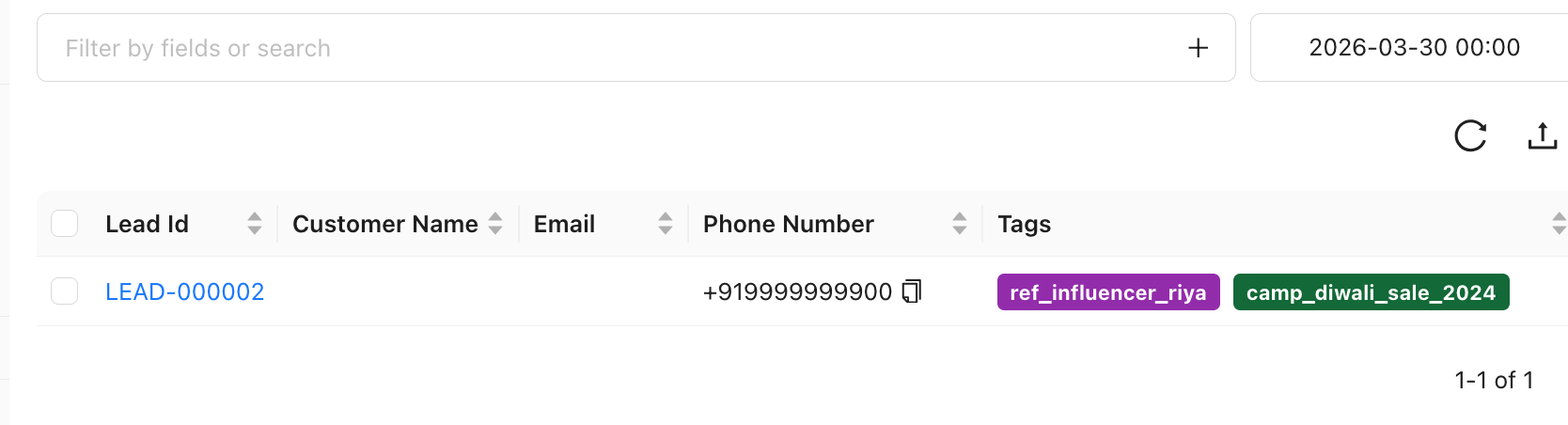
Step 3: Assign Tags to Your Broadcast
When setting up a new broadcast or bulk message in Chakra Chat, you'll see an option to attach a Campaign Lead Tag. Select the tag you created for this campaign. Every contact who responds or interacts with this broadcast will automatically receive that tag on their profile.
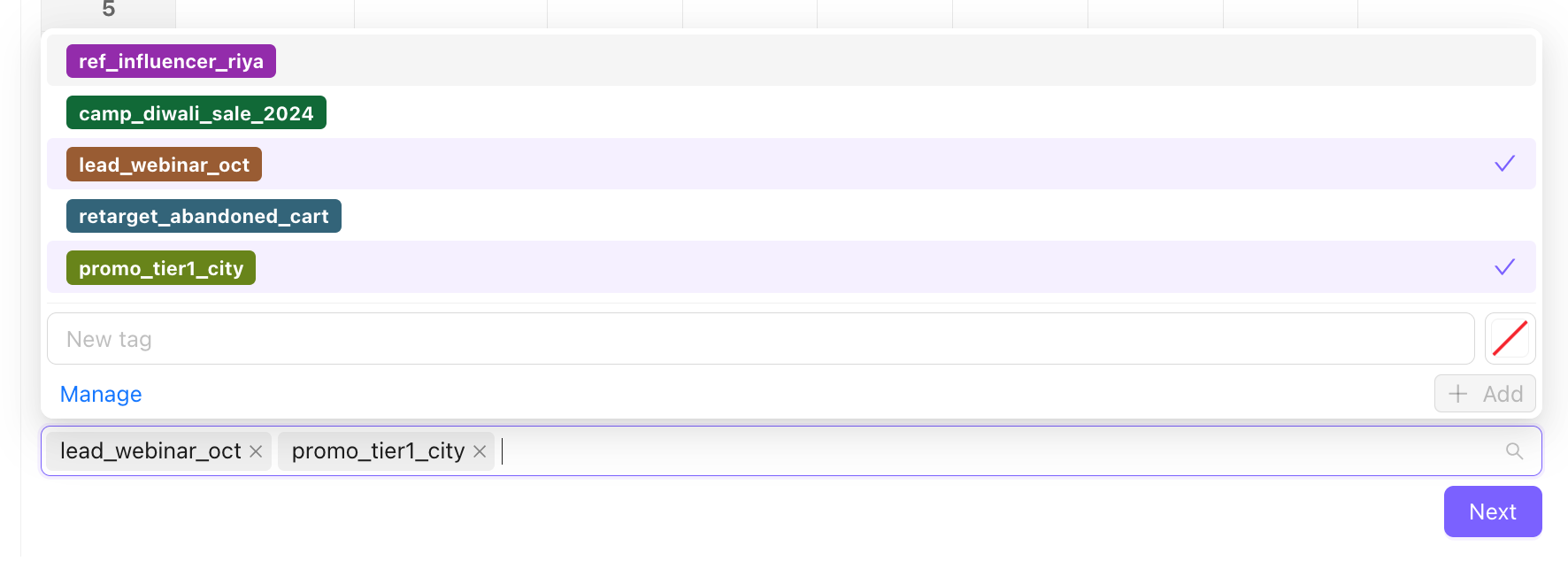
Step 4: Use Tags in Automations
In your automation builder, set tag conditions as triggers or filters. For example: "If contact has tag camp_webinar_nov, send follow-up sequence B." This is where the real power of tagging kicks in - your responses become context-aware.
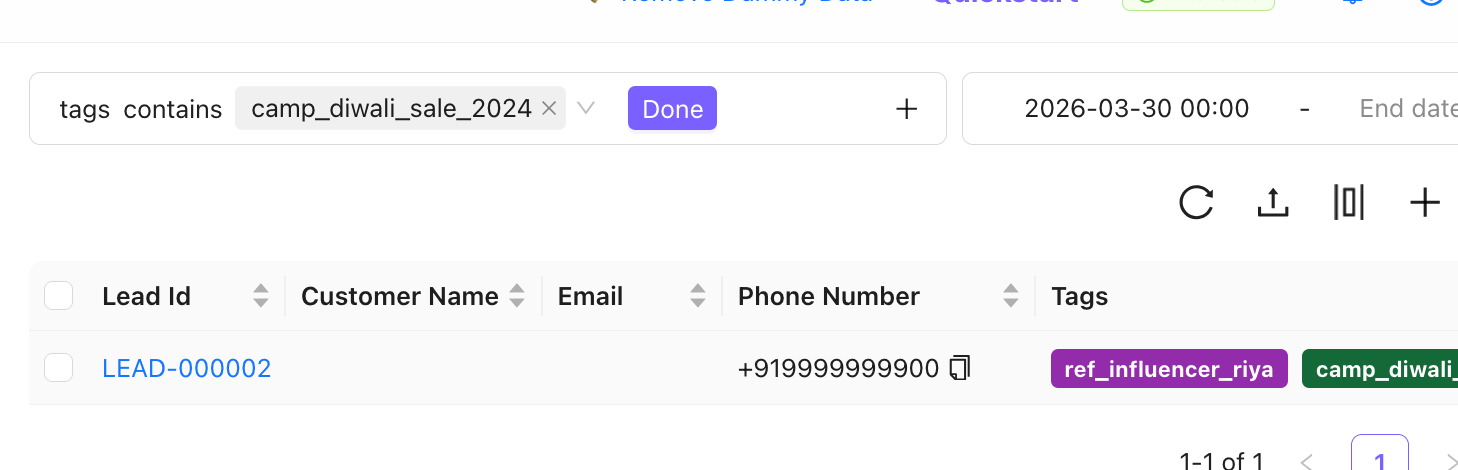
Step 5: Filter and Report Using Tags
In your contact list and analytics views, use tags as filters to pull campaign-specific data. Track conversion rates, response times, and pipeline movement per tag to build your attribution picture.
Step 6: Audit and Clean Tags Regularly
Schedule a monthly or quarterly review of your tag library. Remove tags from outdated campaigns, merge near-duplicate tags, and update your documentation.
For a full walkthrough with screenshots, check out the Campaign Lead Tags Management guide in the Chakra Help Centre.
Best Practices for Campaign Tagging in Chakra Chat
A tagging system is only as useful as it is consistent. Here are the habits that separate teams who get value from their tags from those who end up with a cluttered, confusing mess.
Adopt a Consistent Naming Convention - and Stick to It
Decide on a format before you create your first tag. A good structure looks like:
[type]_[campaign-name]_[quarter/year]
Use Colour Coding as a Quick Visual Signal
Chakra Chat lets you assign colours to tags. Use this. A simple system - say, green for active campaigns, yellow for nurture sequences, red for churned leads - lets anyone scanning a contact profile instantly understand context without reading every tag name.
Limit Tag Proliferation
More tags does not mean more data. It usually means more noise. Before creating a new tag, ask: does this need to be its own tag, or is it a variation of an existing one? Set a soft limit - many teams cap themselves at 3-5 tags per active campaign phase - and review before adding new ones.
Don't Overcomplicate Tag Names
A tag called lead_whatsapp_broadcast_diwali_festival_sale_november_tier2_retarget is technically accurate but completely unusable. Aim for names that are descriptive enough to be unambiguous but short enough to scan at a glance. If you need more than 4-5 words, you're over-engineering it.
Document Your Tag Strategy
Keep a living document - even a simple spreadsheet - that lists every tag, what campaign it belongs to, who created it, and whether it's still active. This is the single most underrated practice in tagging. When a team member leaves or a campaign ends, that document is what saves you from a year-old mystery tag that nobody remembers creating.
Tag What Matters - Not Everything
Not every contact interaction needs a tag. Focus your tagging on campaign entry points, key conversion milestones, and high-value audience segments. If you tag everything, you end up with noise. If you tag the things that drive decisions, you end up with signal.
Troubleshooting and Common Pitfalls
Even well-intentioned teams run into the same tagging mistakes. Here's how to spot them before they become a problem.
Tagging But Never Acting On It
This is the most common one. Teams set up tags, contacts get labelled, and then... nothing. No filtered views, no automations, no reporting. Tags only pay off if someone is actually using them. Build at least one weekly habit around tag-based review - even just checking how many contacts were added per tag this week.
Using Too Many Tags Per Contact
If a single contact has 12 different tags, something has gone wrong. Either tags are too granular, automations are over-eager, or nobody audited the system in months. Contacts with too many tags become impossible to reason about. Set a review trigger: if any contact has more than 5 active tags, investigate why.
Missing a Tag Strategy Before Launch
Trying to set up tags after a campaign has already run is painful and usually incomplete. You lose attribution for early responders, and you often end up with inconsistent tag coverage. Make tag setup part of your campaign checklist - it should happen before you hit "send" on any broadcast.
Over-Relying on Manual Tagging
Manual tagging by agents is slow, inconsistent, and error-prone. If your current process depends on someone remembering to apply a tag after every conversation, you will have data gaps. Use Chakra Chat's automation capabilities to apply tags based on triggers - broadcast responses, keyword matches, or pipeline stage changes - and reserve manual tagging for edge cases only.
Not Removing Outdated Tags
Campaigns end, but tags often don't. A contact with a tag from a campaign that ran two years ago looks like it still has campaign context when it doesn't. Build a quarterly cleanup ritual: review your tag library, archive or delete campaigns that ended, and strip outdated tags from contacts so your active data stays clean.
Conclusion: Small Labels, Big Clarity
Campaign Lead Tags might look like a minor feature on the surface. But the teams who use them well end up with something rare in WhatsApp marketing: full-funnel visibility.
You know which campaigns brought in your best leads. You know which audiences respond better to which messaging. You can trigger automations with context, build audiences with precision, and walk into any campaign debrief with actual data instead of gut feel.
In a channel as personal and high-intent as WhatsApp, that context is everything. A conversation that knows where it came from is a conversation that can go somewhere meaningful.
Start simple. Pick a naming convention. Tag your next broadcast. Then build from there.
Ready to get started?