
WhatsApp Business Calling API: The Complete Guide for 2026
The WhatsApp Business Calling API enables you to initiate and receive calls with users on WhatsApp using VoIP. This is an upcoming feature as part of the WhatsApp Business Platform.
The WhatsApp Business Calling API launched on 15 July 2025. Businesses can now make and receive VoIP calls with customers directly inside WhatsApp. This guide covers everything you need to know to get started with Chakra Chat.
What is the WhatsApp Business Calling API?
The WhatsApp Business Calling API enables businesses to initiate and receive Voice-over-IP (VoIP) calls with customers directly on WhatsApp. It is part of the WhatsApp Cloud API hosted by Meta and integrates voice calling seamlessly into existing messaging conversations — giving customers a unified, multi-modal experience without switching apps.
Unlike traditional telephony, calls take place entirely within WhatsApp, are end-to-end encrypted, and appear in the same conversation thread as your messages.
Why WhatsApp Calling API is a game-changer
Your customers already live on WhatsApp. The Calling API means they never have to leave it to speak with you — no hold music, no new app, no unfamiliar number to trust. For businesses, that is one less barrier between a question and a sale.
Meta describes the core offering as Trusted, Multi-Modal, Feature-Rich Global Connection. Those are four words that sound like marketing — until you unpack what each one unlocks for your team.
What This Actually Saves You
Two concrete cost dynamics are worth calling out, since they're what actually move a founder or ops head from "interesting" to "worth doing":
Call deflection reduces traditional telephony spend. Every conversation that starts in WhatsApp chat and resolves as a WhatsApp call is a conversation that never touched your PSTN minutes, IVR infrastructure, or a separate toll-free line. For support-heavy businesses, this can meaningfully reduce dependence on legacy call center infrastructure over time, not replace it overnight.
No new number to build trust around. Standing up a new support or sales phone line usually comes with an invisible cost: the time it takes customers to trust and remember it. Calling on WhatsApp uses the same verified number your customers already have saved, which means zero ramp-up cost on the trust side — a subtle but real advantage over launching, say, a new toll-free collections line.
Is the WhatsApp Calling API Right for Your Business?
Before getting into features and setup, it's worth answering a more basic question: does voice calling on WhatsApp actually solve a problem you have?
It's a strong fit if:
- Your support team currently asks customers to "call this other number" mid-chat, breaking the conversation and losing context
- You're running outbound collections, payment reminders, or appointment confirmations that convert better with a human voice than a text nudge
- Your customers are already comfortable and active on WhatsApp, and a phone call feels like a step backward, not forward
- You operate across multiple countries and don't want to maintain separate local calling infrastructure per market
It's a weaker fit, at least for now, if:
- Your primary market is the US, Canada, Egypt, Vietnam, or Nigeria, where business-initiated calling isn't currently available — you'd be limited to user-initiated calls only in those markets
- Your call volume is low enough that a simple callback-request flow through chat already covers the need
- Your team doesn't yet have any WhatsApp Business API presence — in that case, get your messaging foundation right first, since calling builds on top of it, not the other way around
The honest framing: this isn't a replacement for a call center. It's a way to remove the friction of switching numbers or apps for the conversations that were always going to need a voice call anyway.
Key Features & Capabilities
- Secure voice calls: VoIP calling over WhatsApp with end-to-end encryption — no traditional phone network required.
- Two-way: Two-way calling: businesses can both receive calls from customers and initiate calls to customers.
- User-initiated calling: Customers can tap the call icon in the business profile or chat window, or select a call button sent in a message.
- Business-initiated calling: Businesses can call customers after obtaining explicit permission via a call permission request template sent during an open conversation.

- IVR integration: IVR menus let customers navigate using a numeric keypad displayed inside WhatsApp, improving routing and self-service.
- Call routing: Calls can be routed to WebRTC or SIP-based systems. Traditional phone network bridging is not supported.
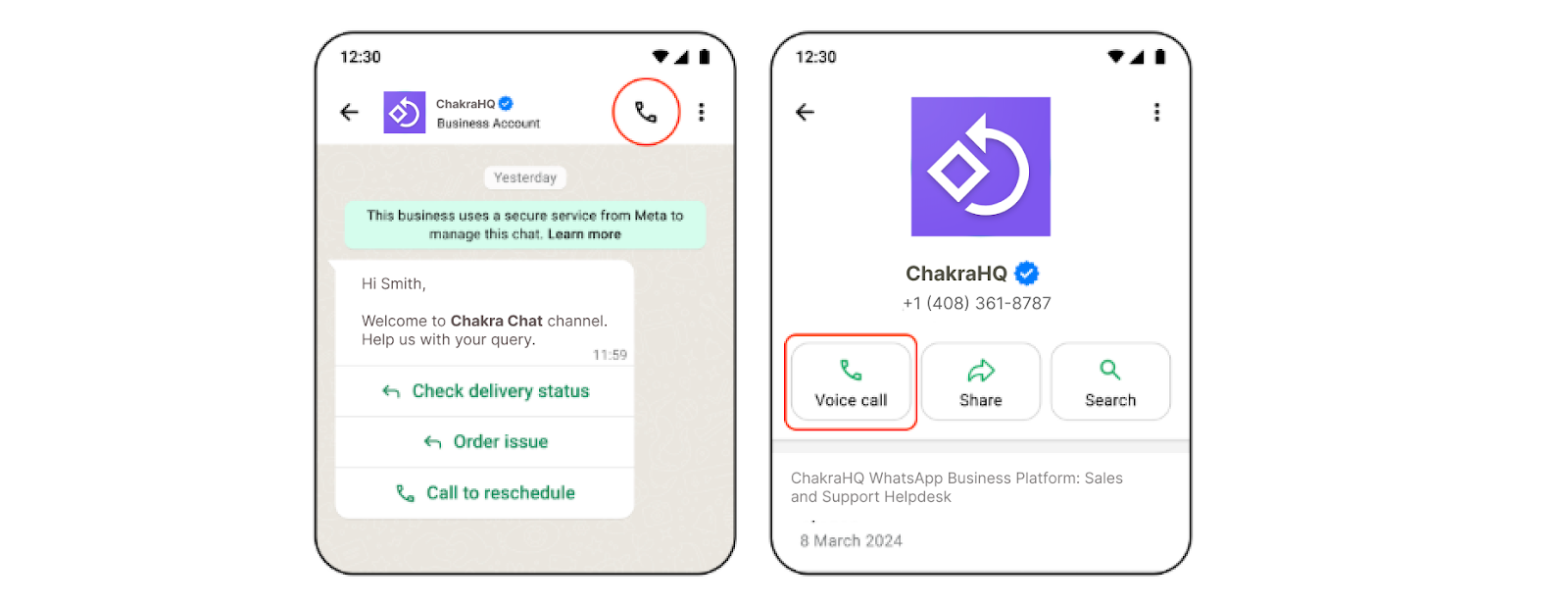
- Configurable availability: Configure call icon visibility, business hours, inbound call controls, and callback requests.
- Contact centre integration: Integrates with cloud contact centre and VoIP platforms for seamless messaging-to-voice handoff.
- Cloud-native: Part of the Meta-hosted Cloud API — no infrastructure to manage.
- Coming soon: Video calling and screen sharing are on the roadmap. Reach out to Chakra Chat for timeline details.
WhatsApp Calling API vs. Traditional Phone Support & VoIP Platforms
| Traditional Call Center / PSTN | Standalone VoIP (Twilio, etc.) | WhatsApp Calling API | |
|---|---|---|---|
| Number customer needs to trust | A new, often unfamiliar number | A new, often unfamiliar number | The number already in their WhatsApp |
| Requires leaving the chat conversation | Yes | Yes | No — call happens in the same thread |
| Global reach | Per-country carrier agreements | Broad, but built separately per market | Wherever WhatsApp Cloud API operates |
| Consent model | Implicit (customer dials in) | Varies by implementation | Explicit, enforced by Meta (permission template + 72-hour window) |
| Infrastructure to manage | Significant (lines, IVR hardware/software) | Moderate (still your own stack) | None — Meta-hosted Cloud API |
| Combined text + voice history | No, usually separate systems | No, usually separate systems | Yes, single thread |
| Cost to end user | Sometimes charged (toll numbers) | Usually free (app-based) | Always free for the customer |
The practical takeaway: WhatsApp Calling isn't competing to replace your entire contact center stack — it's the better default for any conversation that starts in WhatsApp and needs to become a voice call, since it removes the "now give me your number" step entirely.
Business-Initiated Calling:
Because businesses are initiating the call, Meta requires explicit user consent. Here is the flow:
- Send a call permission request template during an open conversation (marketing, utility, authentication, service, or free entry point conversation window).
- Limits: 1 permission request per 24 hours and 2 per week per user.
- Once the user grants permission, the business has 72 hours to place one call.
- Unanswered or rejected calls count against quality thresholds — 2 consecutive unanswered calls trigger a system message; 4 consecutive unanswered calls revoke the permission automatically.
Security, Privacy & Consent — What Business Leaders Should Know
For a founder or operations head evaluating this, the consent and privacy mechanics matter as much as the feature list.
Encryption. Calls are end-to-end encrypted, the same standard WhatsApp applies to messages — Meta itself cannot listen to call content, and neither can your BSP unless you've explicitly built recording or transcription on top of the raw media stream.
Consent is enforced by the platform, not just your policy. Unlike traditional outbound calling, where consent is often a matter of internal compliance discipline, WhatsApp's permission-request-and-window model makes non-consensual business-initiated calling structurally difficult — you cannot call a customer who hasn't explicitly granted permission within the last 72 hours, and repeated unanswered calls automatically revoke that permission. This reduces your compliance exposure compared to running your own outbound dialer.
Call recording is opt-in, and your responsibility to disclose. Meta doesn't natively record or transcribe calls. If you add recording or transcription through your BSP, standard call-recording consent and disclosure laws in your operating jurisdictions still apply — the platform's built-in consent flow covers permission to call, not permission to record.
Data residency and retention follow the same principles as your existing WhatsApp messaging data — worth confirming with your BSP how call metadata and any recordings are stored and for how long, particularly if you operate in a regulated industry like finance or healthcare.
Technical Architecture
The Calling API supports three signalling and media configurations:
Additional audio codecs (PCMA, PCMU / G.711) are supported. You can also use SDES instead of ICE+DTLS with the default Graph API + Webhook signalling.
Getting Started: A Practical Rollout Plan
Beyond the technical prerequisites (verified Business Manager account, dedicated Cloud API number, BSP setup), most businesses see better results rolling this out in phases rather than enabling it for every use case on day one:
Phase 1 — Pilot with one use case. Pick the single highest-friction scenario today — usually support escalation or collections — and enable calling for that flow alone. This gives your team a controlled way to learn the permission and call-quality mechanics before scaling.
Phase 2 — Train your team on the consent flow. Agents need to understand that a call permission isn't a green light to call whenever convenient — it's a 72-hour, one-call window. Building this into your team's workflow avoids wasted permissions and protects your answer-rate standing.
Phase 3 — Layer in IVR for self-service. Once live calling is working smoothly, add IVR menus for common inbound scenarios (order status, appointment changes) to deflect calls that don't need a live agent at all.
Phase 4 — Expand to additional use cases and, if relevant, AI voice. With call quality metrics stable, extend calling to sales conversion or post-purchase support, and evaluate whether an AI voicebot layer makes sense for any remaining repetitive call volume.
Chakra Chat supports this phased approach directly — start with early access to WhatsApp Calling and layer in additional use cases as your team gets comfortable with the consent and call-quality mechanics.
Use Cases
The WhatsApp Business Calling API can help businesses with various use cases by integrating voice calls seamlessly into their WhatsApp customer interactions, enhancing their customer engagement, support, and sales outcomes.
Use Cases, By Industry
The generic use case table (support escalation, sales conversion, payment follow-up) holds true across industries, but here's what it actually looks like in practice:
Financial Services & LendingLoan officers can move a qualified chat lead to a voice conversation to walk through terms, and collections teams can call customers who've gone unresponsive to text-based payment reminders — all inside a single, verified, trusted thread, which matters more in a category where phone-based scams have made customers wary of unfamiliar numbers.
Healthcare & ClinicsAppointment confirmations and pre-visit instructions can escalate to a quick call for anything requiring more nuance than a text (medication questions, pre-procedure instructions), without asking a patient to call a separate clinic line and repeat their history.
Retail & D2C E-commerceHigh-value or complex orders (furniture, electronics, custom configurations) benefit from a call-based consultation mid-chat, while post-purchase issues — returns, damaged items — can be resolved by voice without losing the order context already visible in the thread.
Real EstateA property inquiry that starts as a chat (budget, location, timeline) can move to a call the moment it's clearly a serious lead, letting an agent build rapport faster than a back-and-forth text negotiation would allow.
Travel & HospitalityBooking confirmations, itinerary changes, and urgent day-of-travel issues (a delayed flight, a booking change) are natural candidates for a call, especially when the customer is already mid-journey and needs a faster resolution than chat allows.
Other Use cases:
_________________________________________________________
A Practical Example: Collections Recovery
A mid-sized lending business was seeing a large share of payment reminder messages go unread past the due date, with the only fallback being a generic outbound call from a separate collections line — one many customers didn't recognize or trust enough to answer.
By moving to WhatsApp Calling, the flow changed: a payment reminder message included a call permission request, framed around resolving the specific overdue amount. Customers who'd been ignoring texts from an unfamiliar number engaged instead through the same verified WhatsApp thread they already used for account updates — because it was a number and a conversation they already recognized, not a cold call from an unfamiliar line.
The lesson generalizes beyond collections: any scenario where the barrier to response is "I don't trust this number" benefits disproportionately from calling inside a thread the customer already trusts.
Pricing
User-initiated calls are free to businesses. Business-initiated calls are charged per minute, calculated in six-second increments (rounded up). A valid payment method is required on your Meta account to place business-initiated calls.
Pricing varies by the destination country of the customer's number. The table below shows list rates (base volume tier). Volume discounts of up to 50% are available at enterprise tiers.
Limits & Quotas
Best Practices to Maintain High Answer Rates and Avoid Permission Revocation
The limits table shows the mechanics, but here's how to actually operate within them without losing calling privileges:
- Only request permission when you're actually ready to call. Since a granted permission expires in 72 hours and is capped at one use, requesting it speculatively (before your team can realistically follow up) wastes the window and adds friction for the customer.
- Prioritize calls you're confident will be answered. Two consecutive unanswered calls trigger a system-level warning signal, and four revoke permission entirely — treat your outbound call list the same way you'd treat deliverability on messaging: quality over volume.
- Use the call permission template's context to set expectations. A permission request that clearly states why you want to call (e.g., "to help finalize your loan application") gets answered more reliably than a generic one.
- Route through IVR for high-volume, repetitive inbound calls. This reduces the load on live agents and keeps your team focused on calls that actually need a human.
- Monitor call analytics regularly, not just messaging metrics — a declining answer rate is an early warning sign worth investigating before it affects your permission standing at scale.
Key updates
Conclusion
Overall, the WhatsApp Business Calling API empowers businesses to meet customer expectations for voice interactions on a platform they already use, driving better support, sales, and operational efficiency across industries such as finance, healthcare, retail, and more. Sign up with Chakra Chat for early access to the WhatsApp Calling feature as this goes live soon.
FAQs
Are international calls supported?: Yes, cross-border calls are supported wherever Cloud API is available.
Can calls and messages share the same number?: Yes. The same Cloud API phone number handles both messaging and calling.
Can I send messages during a call?: Yes. The standard message API works while a call is in progress.
Does Meta provide call recording, transcription, or voicemail?: Not natively — but Chakra Chat and other WhatsApp Solution Partners can provide these as value-added services on top of the raw audio stream.
Can an AI voicebot handle calls?: Yes. Meta provides the raw media stream; BSPs like Chakra Chat can layer AI voice capabilities on top.
Are call analytics available?: Yes. Call insights are available in both WhatsApp Manager and the Analytics API.
Can toll-free numbers be used for calling?: Yes, provided the country code is in the supported list.
What happens when the concurrent call limit is reached?: Callers receive a generic message that the call cannot be placed. No webhook is fired. Meta plans to increase this limit over time.
Is calling supported from WhatsApp Web or Desktop? The WhatsApp calling feature is currently supported from Chakra Chat web app.
Is there a trial or sandbox to test this before committing?Yes — sandbox accounts are available for testing call flows before going live with real customer numbers, so your team can validate permission flows and call quality before rolling out broadly.
How predictable is the cost for budgeting purposes?Business-initiated calls are billed per minute (six-second increments) by destination country, so cost scales with actual usage rather than a flat platform fee — useful for forecasting, but worth modeling against your expected call volume and geographic mix before committing to a rollout size.
Does this replace our existing call center?Not typically, and it's not designed to. It's best understood as removing the friction for conversations that start in WhatsApp and need to become a call — a complement to your existing support and sales infrastructure rather than a wholesale replacement for it.
What happens if we exceed our business-initiated call limit in a day?Additional business-initiated calls beyond the daily per-user limit simply can't be placed until the limit resets — there's no overage charge, but it does mean planning outbound call volume against the published limits rather than assuming unlimited throughput.
Last Updated: 24 July 2026