
Connect Multiple WhatsApp Numbers to One API Inbox: Coexistence Guide
Unify multiple WhatsApp numbers into one API inbox via Coexistence. Team routing, chatbots & broadcasts — no chat history lost.
Overview
In today's customer-centric landscape, WhatsApp Business has become non-negotiable - this is where your customers are. The widespread adoption of WhatsApp Business previously and recently, the WhatsApp Business Platform (API) has benefited millions of businesses. While both the solutions are different and tailored to the needs of separate business segments (WhatsApp Business-Local/SMB, while the WhatsApp API is for Mid to Enterprise business needs). The interesting part is that both solutions worked as individual silos, not talking to each other.
Previously, you could not register your existing WhatsApp Business number for the WhatsApp Business Platform (API) without deleting the existing account. Now, with the WhatsApp Coexistence register for the WhatsApp API solution, you can use the existing WhatsApp Business and operate both accounts
This created headaches for teams reliant on the app's simplicity for on-the-go responses. WhatsApp Coexistence changes that. As outlined in Meta's WhatsApp Business Platform documentation and Chakra Coexistence article, it allows the same number to operate both the Business App and the API simultaneously and seamlessly. For a better understanding about Whatsapp Coexistene, check this detailed guide about WhatsApp Coexistence.
Connect Multiple numbers using Coexistence
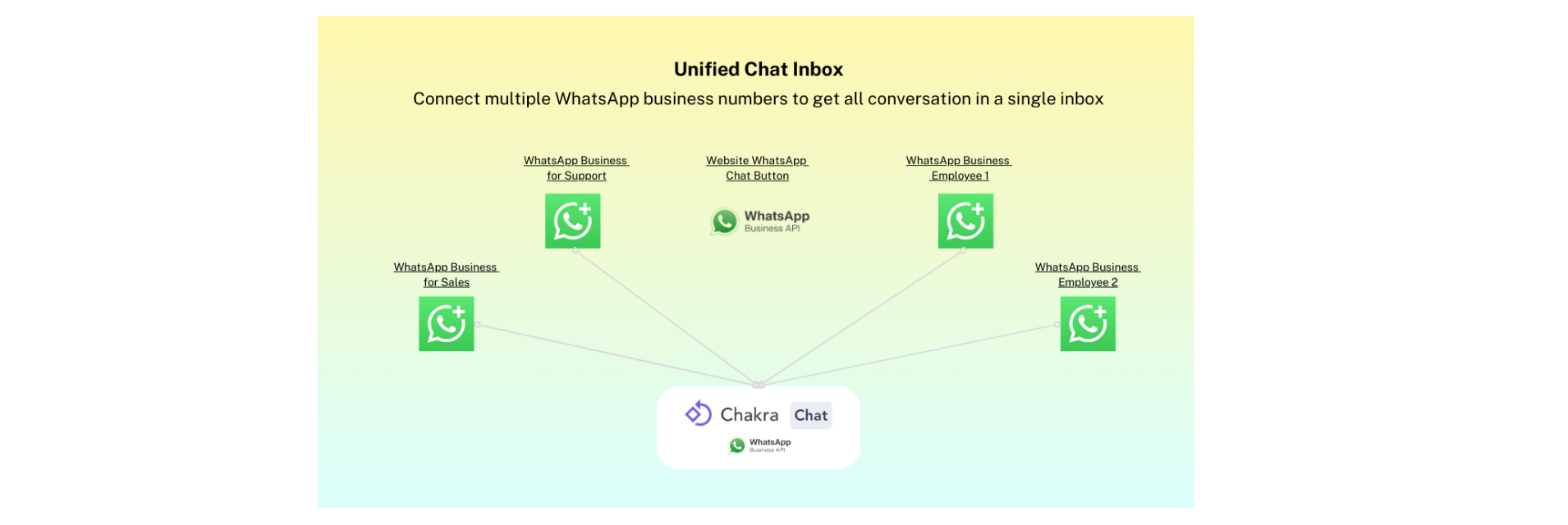
By connecting your numbers to a WhatsApp Solution Partner (e.g., Chakra Chat) via the WhatsApp Business API, you unlock a centralized command center for all your customer conversations.
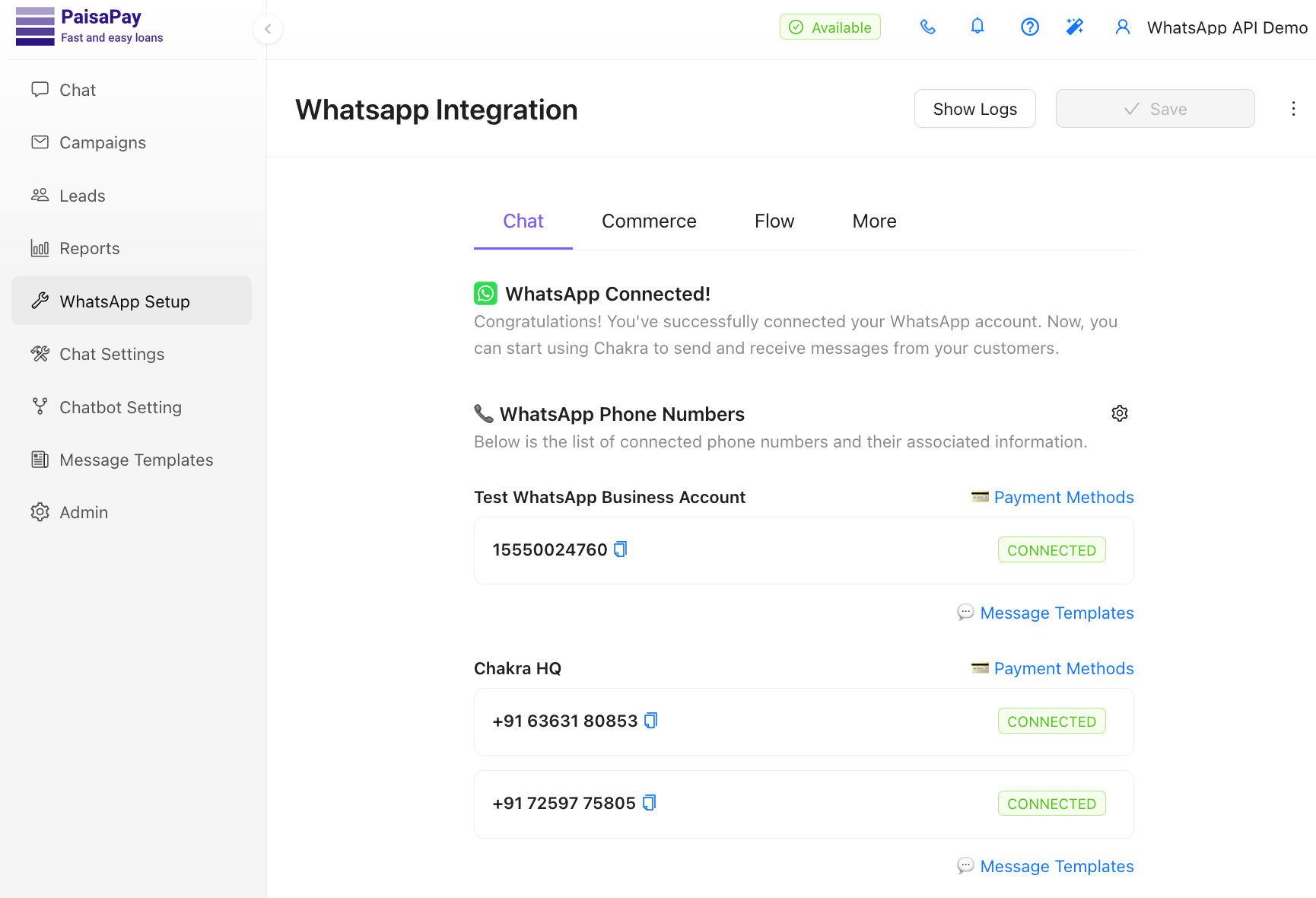
Chakra also helps you solve by seamlessly enabling multiple numbers to be connected, bringing all your organization's WhatsApp numbers under one interface. You can connect existing app numbers or add new ones to a single WhatsApp Business Account (WABA). This unifies your WhatsApp conversations into a unified Chakra's shared inbox, eliminating the need to link the same number across multiple devices.
A hybrid model (Adding all WhatsApp Business app numbers using the Coexistence feature and/or any unlinked number with a standalone WhatsApp Business API in ChakraHQ Chat) where your team uses the app for personal touches and the API for automation, all on the same numbers.
Now, imagine scaling this to multiple numbers, say, departmental lines or regional branches. Chakra's advanced plan supports up to 12 numbers, with additional ones at just $3 each, offering flexibility without limits. This is particularly beneficial for businesses with disparate usage, as it centralizes control and prevents the chaos of managing siloed accounts.
During the WhatsApp API setup, you generally select the "Connect your existing WhatsApp Business App" option, scan a QR code in the app, and sync up to six months of chat history and contacts. This dual access retains the WhatsApp Business app's free, unlimited user-initiated chats while adding API capabilities, such as bulk template messaging, chatbots, AI & CRM integrations, without any additional fees for Coexistence mode itself (though API-initiated templates incur standard WhatsApp charges).
The Problem: Disparate Numbers, Disjointed Experience
Before we dive into the solution, let's crystallize the pain points of managing multiple individual WhatsApp Business apps:
- Limited Accountability: Individual users are in complete control of their WhatsApp business and operate it standalone with little to no oversight. There's no way to track who and when responded to which customer or how quickly, making operational flow and performance measurability a challenge..
- Operational Issues: Multiple phones used by each user with no unifying interface is a stop-gap arrangement at best, which only small businesses can manage. Logging in and out of different phones or instances of the app to check for messages is inefficient and also prone to error.
- Unsecured Communications: Having the same WhatsApp Business account logged in on multiple devices while sharing login details with multiple users violates WhatsApp's terms and is a security compliance headache as businesses try to scale. This definitely will not work.
- Limited Feature Capabilities: The standalone app lacks key features such as broadcast capabilities, advanced automation, AI settings, CRM integration, and detailed analytics, which can hinder growth, and businesses aim to grow into more structured organizations.
- Limited Scale: WhatsApp Business was primarily targeted at individual business owners or solopreneurs. Over time, teams started using this for small/micro businesses involving multiple users in their teams (anywhere between 2-50 or more users). This arrangement is bound to be dysfunctional for them as their scale and volume go up.
- Lacks basic features: Businesses cannot integrate all their operational WhatsApp Business numbers. With limited capabilities for sending messages to contacts, no bulk messaging or automations, or even no integration capabilities to serve as a basic SMB enterprise solution.
Key Advantages to unify Multiple Numbers with Coexistence?
The true value of this use case shines in its benefits, which transform fragmented WhatsApp usage into a streamlined, feature-rich system. Let's break them down, supported by insights from Meta, Chakra, and industry reports.
Unify all Number in Chat Inbox
Connect up to 12 WhatsApp Business numbers (add additional numbers just for $3 per additional number) to Chakra's WhatsApp Business API Advanced Plan, unifying all your WhatsApp business numbers into a single inbox. This eliminates the need for managing apps or devices per number, reducing operational nightmares. Managing multiple numbers in a single view enabled teams to handle conversations collaboratively, boosting response times significantly, >3x in many cases. You always have hierarchical layers to auto-escalate and reply.
For example, a retail chain can link store-specific numbers without losing chat histories for respective stores. If the store is not responding to a customer chat, the business manager gets an escalation notification, and they can reply if the store owner is away.
How Agent Assignment Works
Assign specific numbers or groups to users based on roles. E.g., sales reps access only marketing lines, support teams handle inquiries. Chakra Chat's RBAC (role-based access control) limits inbox access to assigned chats, ensuring compliance and data security. Automated allocation uses rules to route messages, preventing overload. Platforms like ChakraHQ Chat highlight how this scales to unlimited users, unlike the app's four-device limit. In practice, this means no more "who's handling this?" confusion, with teams reporting 40% quicker resolutions.
- Assign your support team the +1-555-SUPPORT number.
- Assign your sales reps the +1-555-SALES number.
- Let your logistics team manage the +1-555-ORDERS number.
Furthermore, automated allocation ensures incoming chats from a specific number are automatically routed to the correct team or agent, streamlining workflow and reducing manual assignment.
Unlock Powerful API Features: Broadcasts, Templates, and More
Coexistence opens the API's arsenal: send interactive template messages, broadcasts to unlimited contacts, and rich media without app restrictions. Chakra enables broadcasts for marketing while keeping app chats free for service. Benefits include personalized outreach, e.g., order updates using message templates (utility), driving >30% higher engagement rates, per Meta's platform stats. No device linking hassles mean teams stay agile.
Automate Responses: Chatbots, Workflows, and AI Integration
Customize chatbots for individual or collective numbers, with off-business hours responses and n8n-powered AI agents. n8n integrates seamlessly with WhatsApp Business Cloud API, allowing no-code workflows like lead routing or sentiment analysis. Chakra's automation includes workflows for reports and reminders, reducing manual tasks by up to 70%. For instance, integrate with CRMs for automated follow-ups, as seen in n8n templates for WhatsApp bots.
Deep Reporting, Metrics
Measure performance with analytics on first response time, resolution rates, and user metrics crucial for ROI. Chakra provides real-time reports, linking leads with custom fields and notes for basic CRM. This visibility helps optimize teams, with studies showing 25% improvement in customer satisfaction scores.
Mobile App for On-the-Go Management
Chakra's mobile app (iOS, Android) mirrors the inbox, enabling responses, lead tracking, and workflows from anywhere—perfect for field teams. This extends Coexistence's mobility, ensuring no downtime. These benefits aren't theoretical. Businesses using similar setups benefit a great deal from faster first responses and seamless multi-number handling.
Key Features of Chakra Chat’s Multi-Number Coexistence
Connect and Manage Multiple Numbers with Ease
Chakra Chat makes it simple to unify all your WhatsApp numbers, whether they’re new or already in use. The platform’s self-serve onboarding process allows you to add a new number in just 4-5 minutes through a step-by-step embedded signup (ES) process. After connecting your Meta (Facebook) account and granting permissions, you can input business details, WhatsApp profile information, and more. Adding additional numbers is even faster under 2 minutes per set with pre-populated WABA details.
Flexible Plans for Every Business:
- Starter Plan: Connect up to 2 WhatsApp numbers.
- Growth Plan: Manage up to 5 numbers.
- Advanced Plan: Support for up to 12 numbers, with the option to add more at just $3 per number.
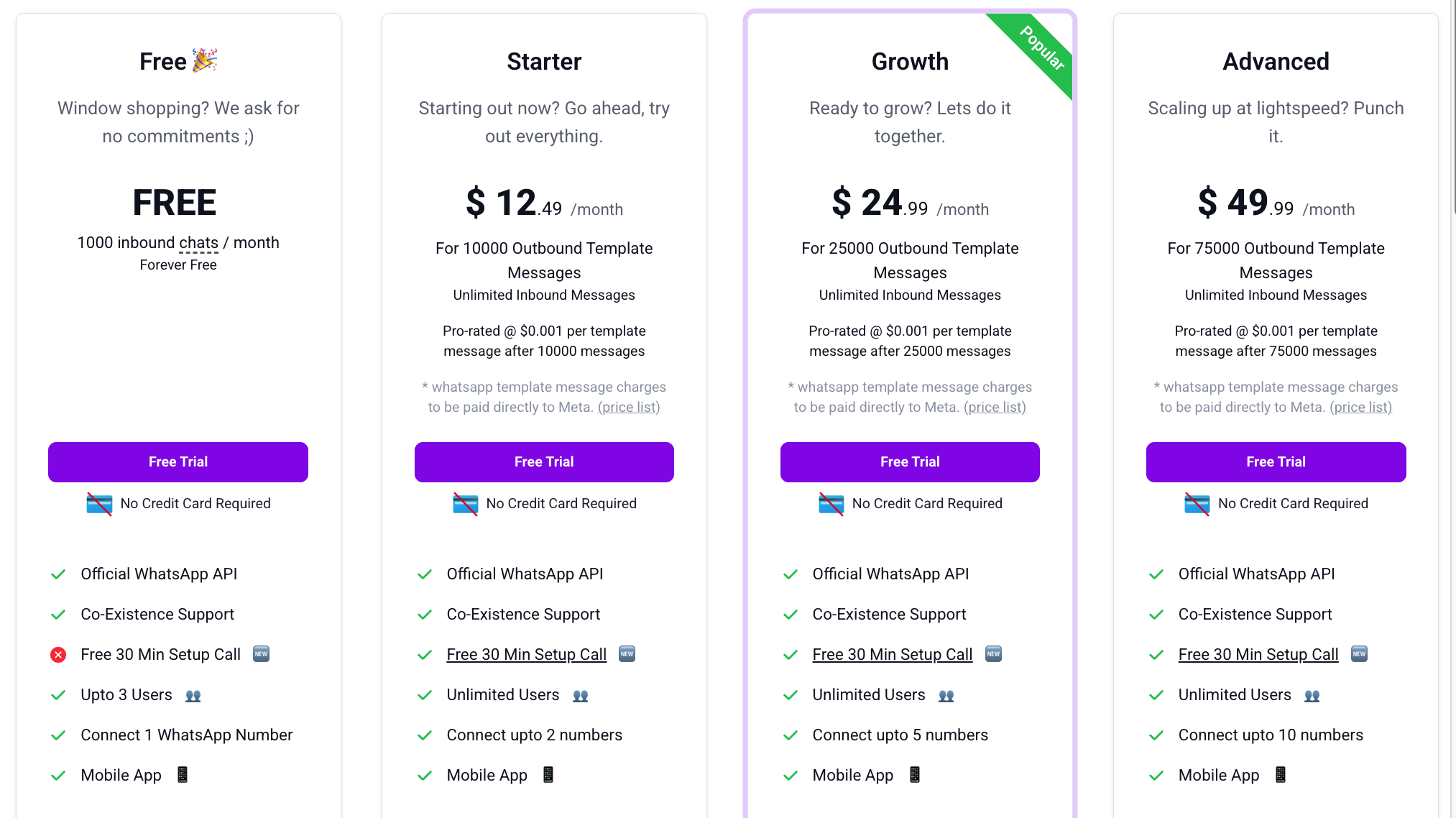
There’s no limit on the number of phone numbers you can add, as Chakra adheres to Meta’s auto-scaling limits for WABA, ensuring flexibility as your business grows. More details on the pricing tiers here.
Seamless Coexistence of WhatsApp API and Business Numbers
Chakra Chat allows you to register both new unlinked numbers and existing WhatsApp Business numbers with the WhatsApp API. This coexistence unlocks powerful capabilities, such as:
- Chatbots for automated customer interactions.
- Interactive template messages for personalized campaigns.
- Integrations with CRM systems, n8n, and other platforms.
- Unified management of sales, support, and other departmental communications from a single dashboard.
By combining the WhatsApp API’s advanced features with your existing WhatsApp Business setup, Chakra Chat creates a robust ecosystem tailored to your business needs.
Power Your Campaigns with Multiple Numbers
Chakra’s drip campaign feature lets you assign specific WhatsApp numbers to different campaign steps, ensuring optimal delivery and engagement. For example:
- Use a marketing number for promotional campaigns like birthday offers.
- Assign an order update number for payment confirmations.
- Use your post-order number for delivery updates.
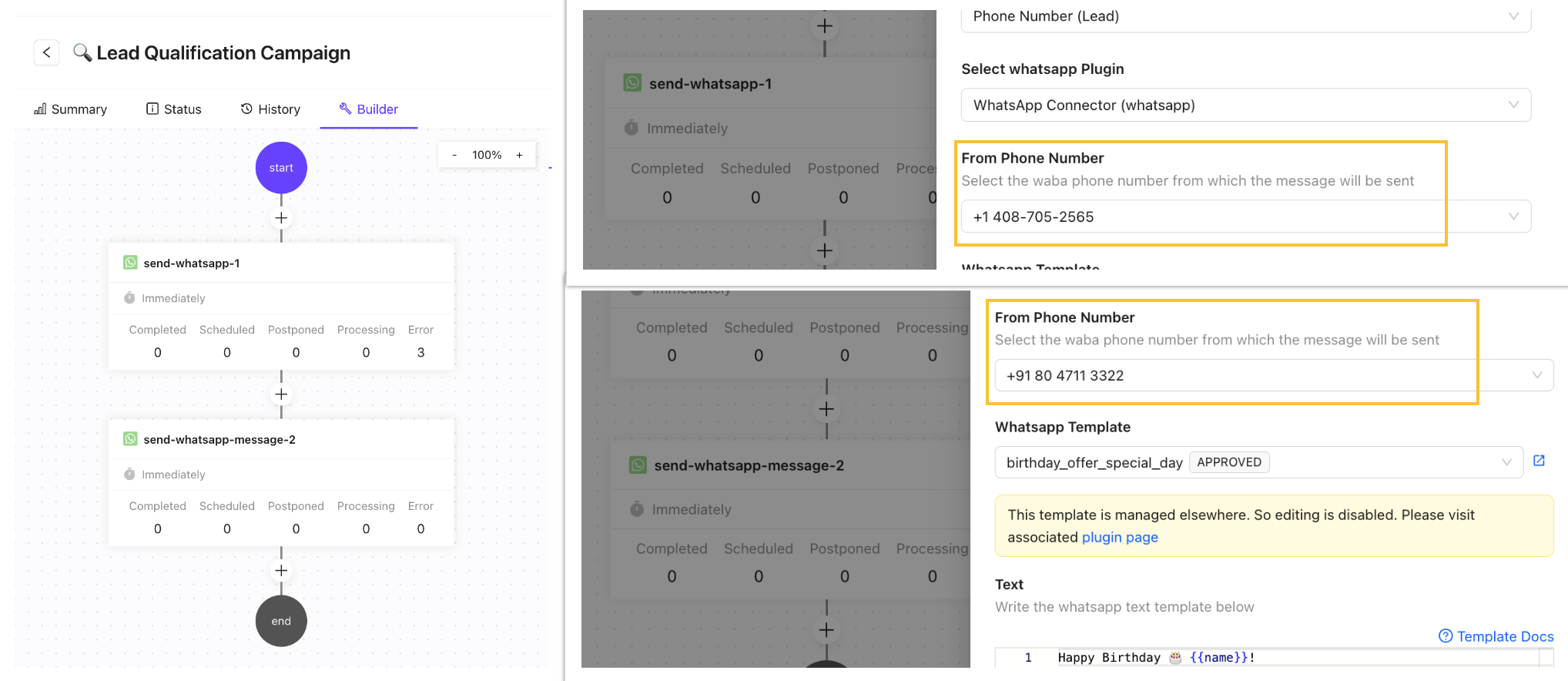
This flexibility helps you:
- Prevent overuse of a single number, reducing the risk of spam flags or blocking.
- Organize campaigns by use case for better tracking and compliance.
- Drive higher message deliverability by diversifying sender numbers.
Unified Shared Chat Inbox
Managing multiple WhatsApp numbers across individual team members or devices can lead to disorganization and compliance challenges. Chakra Chat solves this with its shared chat inbox, which consolidates all chats from connected numbers into one platform. Key benefits include:
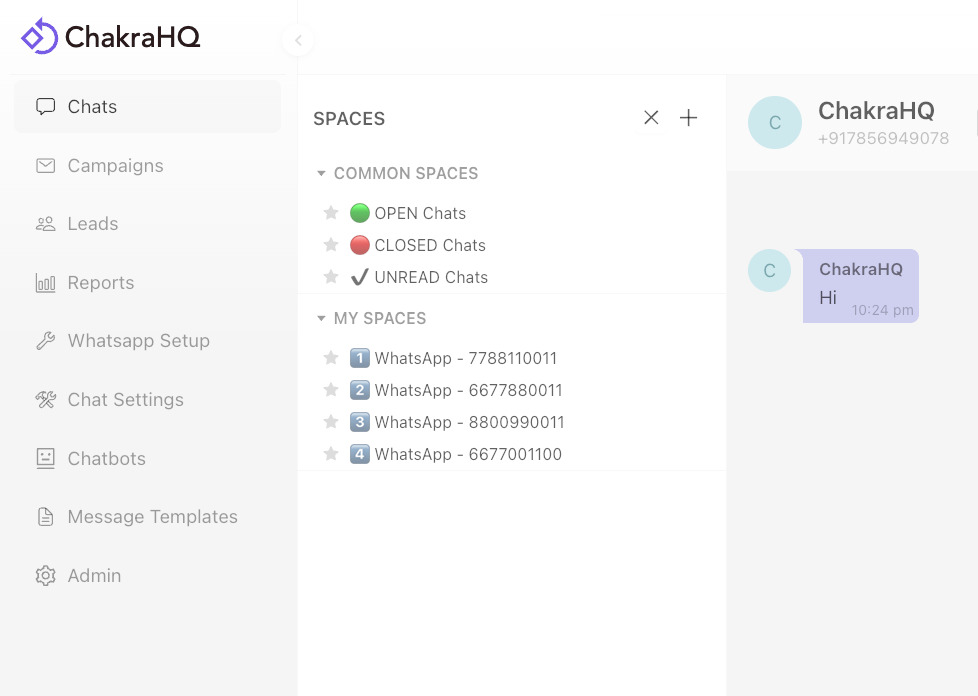
- Admin access: View and manage all chats from the Chakra dashboard.
- Chat history: Access up to 6 months of conversation history for all numbers.
- Team collaboration: Assign notes and nudges to team members for follow-ups.
- CRM integration: Create automated tasks, workflows, and notifications to streamline operations.
Automated Chat Assignment and Inbox Management
Chakra Chat’s inbox settings allow admins to orchestrate incoming chats efficiently. You can:
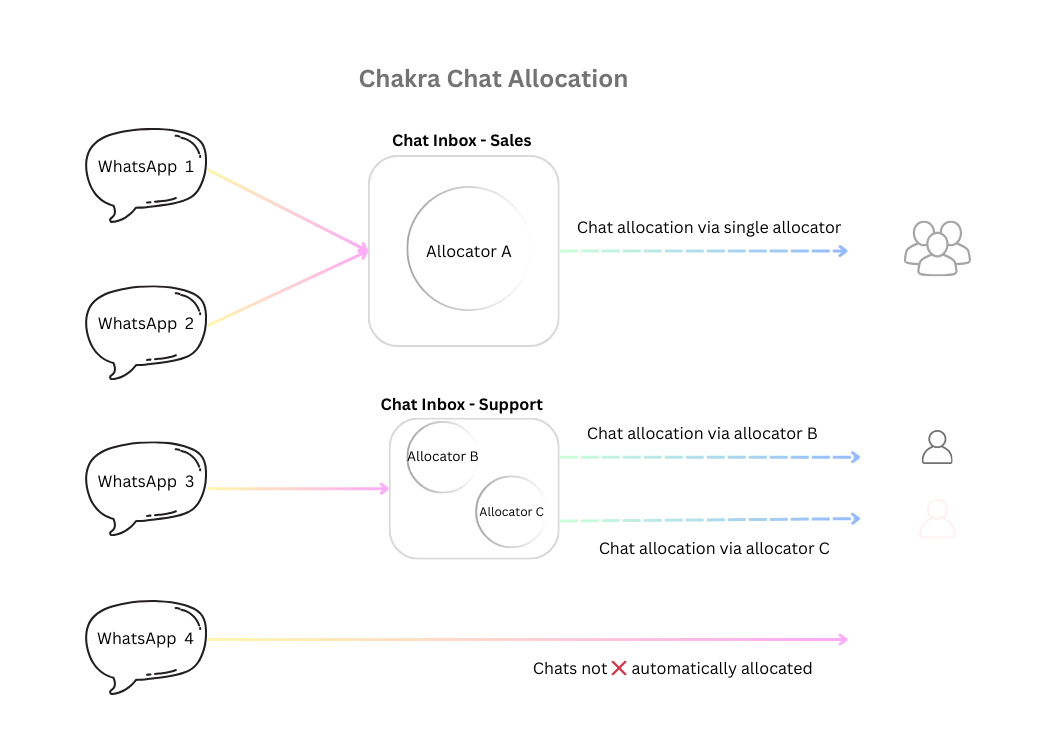
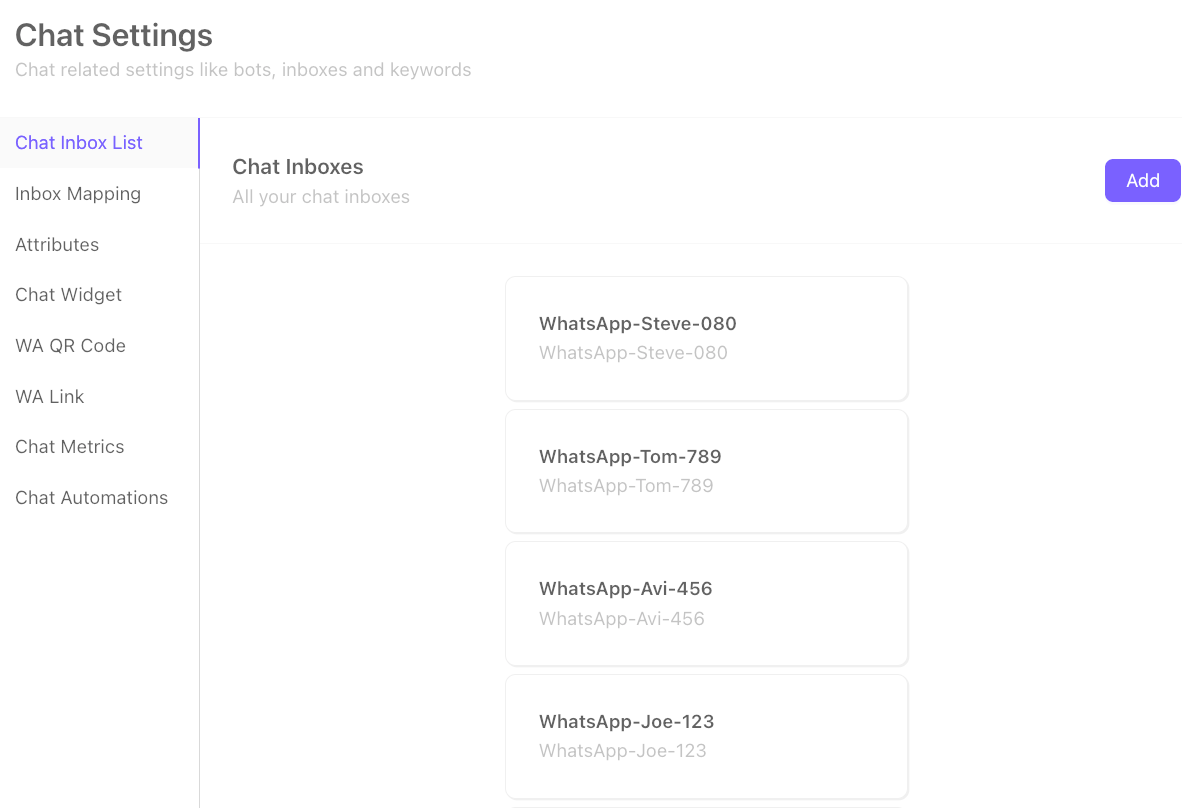
- Create multiple inboxes and map them to specific WhatsApp numbers.
- Set up automated chat routing based on user roles, ensuring chats reach the right team member.
- Use saved filters or Spaces to segregate chats by number or inbox, making it easy to focus on specific conversations.
- Adjust configurations as needed to adapt to changing business requirements.
Robust Chat Reporting and Metrics
Chakra Chat empowers admins with detailed reporting and analytics to monitor performance across connected numbers and users. Track key metrics such as:
- Chats Handled: Measure team and number-specific performance.
- Open Chats: Identify pending conversations for follow-up.
- Unreplied Chats: Ensure timely responses to customers.
- Response Time: Optimize customer support efficiency.
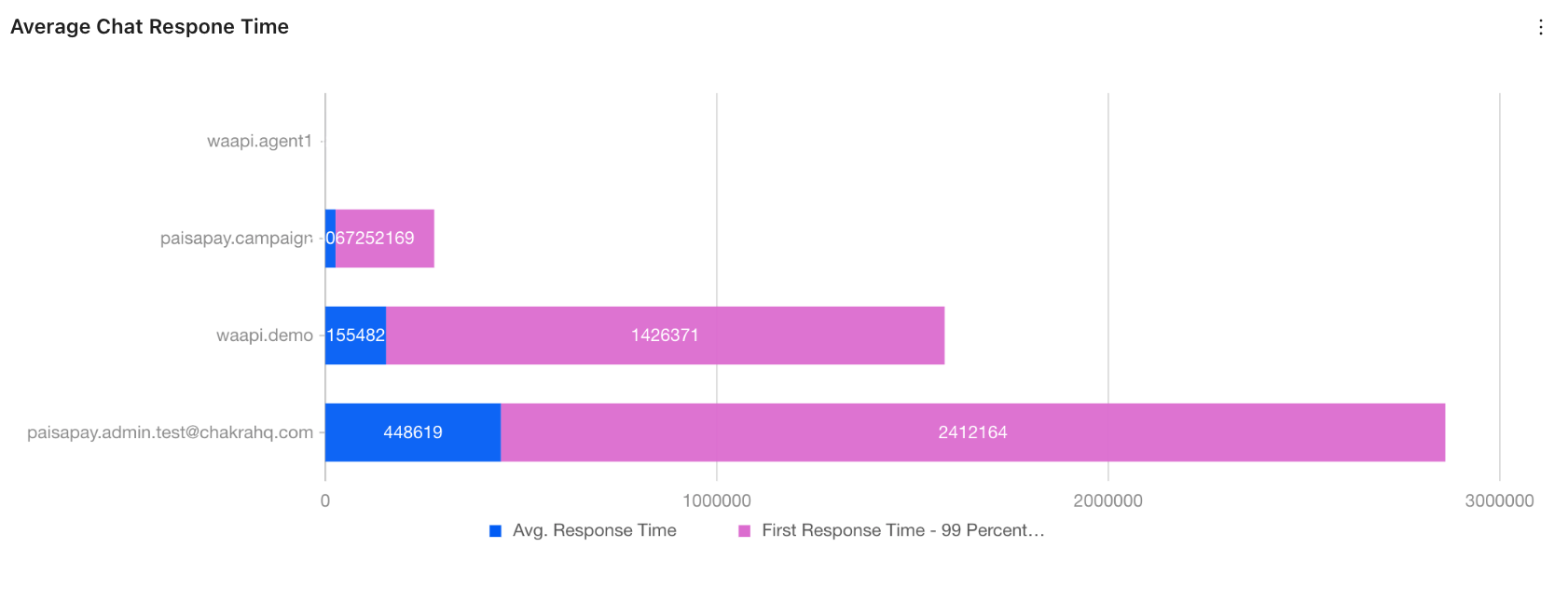
These insights help businesses maintain accountability, improve response times, and enhance customer satisfaction.
Overall Impact: Greater Control, Compliance & ROI
Unifying disparate WhatsApp Business usage via Chakra Coexistence delivers overarching advantages. It provides greater control through centralized management and RBAC, ensuring compliance with data privacy laws like GDPR, vital as WhatsApp enforces strict policies. Analytics empower performance measurement, identifying bottlenecks and rewarding top performers.
The ROI is convincing with no limits on numbers (beyond plan caps), low add-on costs, and automation that scales with growth. n8n or AI agents amplify this, powering advanced workflows like predictive responses. Compared to fragmented apps, this setup cuts operational costs by 40-60%, per industry benchmarks, while boosting customer retention through unified, responsive service.
In conclusion, adding multiple WhatsApp Business app numbers using Coexistence with Chakra WhatsApp Business API is a strategic move for any scaling business. It unifies operations, unlocks API prowess, and drives measurable growth. Ready to implement? Start with Chakra's free onboarding demo account and transform your WhatsApp strategy today.